Pages

Monday, December 16, 2013

LG Optimus L9 Ownership Review & Specs

When I was in my car one day I heard about a promotion going on at my local cell phone provider location. The promotion not only included a great plan rate but also gave me the option to get an android phone on tab at a discounted price. My options were LG Optimus L9 and Sony Xperia M. I decided to go with the LG Optimus L9 because frankly speaking the Xperia M was out of stock and i had to wait 1 week if I wanted the Xperia M,satisfied with my selection of the LG Optimus L9, I took the phone on my way home and started downloading apps with my 4G data which came with my plan, and this phone did pretty great at performing at high speeds as it is 4G capable. After downloading the first 25 apps, such as my social apps as well as some school related apps, I was surprised to find out that I couldn't download anymore apps because my 4GB of internal storage was filled with software updates and I only had 1.2 GB of internal storage. Of course you can move some apps to SD card which I did but most big apps cannot be moved to external storage. Annoyed by that I inserted my SD card and started moving apps and also started taking pictures. The camera quality is amazing and I cannot lie. This phone has a 5MP with LED flash and it does record 1080p HD video. You can my recorded videos at http://www.youtube.com/channel/UCI1Evh2EdLHaDehDD0e0rdg/videos , all videos are recorded by this phone. However the front camera is 0.3MP and is horrible quality, makes everything look dull and dark. The front camera really annoyed me considering my older iPad's front camera is better quality. There are some other things that annoyed me so I will break it down for what I like and what annoyed me below.

Cons

  • 1GHZ Dual Core Processor which is extremely slow and apps like Instagram make it crash over and over. 
  • Horrible front camera.
  • Screenshot feature - the screenshot button is the volume down and power, either the phone sleeps or the volume turns down. Take note that LG Quick Memo is volume up and power, so that does the job but there will be a watermark saying LG Quick Memo which is horrible. 
  • After 1 month of ownership, the battery life started getting worse. 
  • Camera app takes forever to open. 
  • Doesn't come with earphones. 
Pros
  • Amazing back camera capable of taking great quality pictures and filming in full HD
  • Sleek design, fits in hand easily. 
  • Gorilla Glass 2 
  • LG Apps, Themes and options 
Features:
  1. Android 4.1.2 Jellybean Operating System 
  2. 4G HSPA+ Capable 
  3. 4.5" Gorilla Glass 2 Touchscreen 
  4. 1GHZ Dual Core Processor 
  5. Internal Memory: 4GB
  6. Weight 120g
  7. 5MP Camera with LED flash, 0.3 MP front camera 
  8. WiFi/Bluetooth
Well that's it for this post. Hope you got some information out of this. 


Tuesday, September 10, 2013

iPhone 5S and 5C

 
The long awaited day has came where the iPhone 5S and 5C were announced. Apple announced today of their new fascinating devices. But who will these phones attract, the common white girls with white iPhones? The business men? Or just regular people like you and I? Since iPhone 4 came out, I dont see a change in the looks of the iPhone's except the fact that some are longer than the other and some thinner. The software has changed but nothing surprised me. Its the same iPhone just made rounder or smaller and Apple seems to do that every time. The specs seem good but the view of people towards it don't go too well with what Apple is saying. Well of course we have yet to test it our before buying or just to say anything in general but before that lets take a look at the specs.


iPhone 5SiPhone 5CiPhone 5
Operating systemiOS 7iOS 7iOS 6
Display4-inch IPS LCD; 1,136x640 pixels, 326 ppi4-inch IPS LCD; 1,136x640 pixels, 326 ppi4-inch IPS LCD; 1,136x640 pixels, 326 ppi
Price$199, $299, $399$99, $199, $549 off contract (16GB)No longer sold
CarrierAT&T, Sprint, T-Mobile, VerizonAT&T, Sprint, T-Mobile, Verizon, GlobalAT&T, Sprint, T-Mobile, Verizon
4G LTEYesYesYes
Camera8-megapixel, 1080p front-facing, dual-element flash8-megapixel, 720p front-facing8-megapixel, 720p front-facing
ProcessorProprietary A7 CPU (64-bit)Proprietary A6 CPU (32-bit)Proprietary A6 CPU (32-bit)
Memory16GB, 32GB, 64GB16GB, 32GB16GB, 32GB, 64GB
BatteryTalk time up to 10 hours on 3G; embeddedTalk time up to 10 hours on 3G; embeddedTalk time up to 8 hours on 3G; embedded
NFCNoNoNo
Fingerprint scannerYesNoNo
Dedicated fitness trackingYesNoNo
Weight and thickness3.95 ounces, 0.3 inch4.65 ounces, 0.35 inch3.95 ounces, 0.3 inch
ColorsGray, gold, silverBlue, green, pink, yellow, whiteBlack, white
Comparison information provided by cnet, read more: (http://reviews.cnet.com/8301-6452_7-57602215/iphone-5s-vs-iphone-5c-vs-iphone-5-specs-compared/

How To Get Free Apps On Android Without Rooting!

Another reason why Android is a better OS is because you don't have to jailbreak to get free stuff like you would on iOS. Hello and welcome to the long awaited post on this blog: How To Get Free Apps on Android. The answer to this question is really simple and can be done using 1 of 2 methods. So my friend, without any further adieu, here is how to get free apps on your Android regardless of which android you use.

Option 1:Using just your phone.

  1. Go to your phones browser, doesn't matter if its the default browser or a downloaded browser. 
  2. Go to Google.com
  3. Place .apk after the app you want to search, for example; if you would like to download Snapchat, then go to Google and type snapchat.apk.
  4. Open one of the many results, such as 4Shared
  5. Download the app and open it, it will open the installer and now you have the app. 
Option 2:Using the computer and your phone. 
  1. Open your desktop internet browser. 
  2. Go to Google.com
  3. Place .apk after the app you want to search, for example; if you would like to download Snapchat, then go to Google and type snapchat.apk.
  4. Connect your phone and put it into USB MODE
  5. Open your browsers download folder and move the .apk to your phone
  6. Unplug your phone, open the FILES and find the .apk file.
  7. Open the app and install.
There you go folks, this method is fast and it works. Not only will it get you free apps, you can also bypass any app restrictions your parents or anyone else has set on GooglePlay. Also, GooglePlay says an app is incompatible with your phone; use this method to download the latest apps that you think might work.

Friday, October 12, 2012

Samsung Galaxy Q Review

Hey guys, after almost a year, I have returned to blog! This time, I will promise to blog more often! So anyways, this is my review of the Samsung Galaxy Q. I have owned this phone for just over 2 weeks and this is a review of my experience. The Samsung Galaxy Q was released in August 2011, this might not be the newest phone in the market, but it is a pretty good phone. The Galaxy Q has a 3.2" screen, which is just a little smaller than the iPhone 4/4S. This phone is a compact phone, it might not have the huge screen you are looking for, but it is pretty good for its price! I picked this phone for $200 which is not bad in my opinion. It has a 3.15 MP camera, with zoom and LED flash. The camera on this phone isnt good at all. It does take decent sized pictures but the quality isnt that great. For example, during class; I take a lot of pictures of sheets, newspapers so I can go home and continue my homework, this phone takes bad quality pictures and the text is not readable. My old Huawei phone had a 3.2 MP camera and it took much better pictures than this phone does. Also, it does not have a front facing camera but you can make voice calls via Skype. This phone runs Android 2.3 (Gingerbread) but some come with 2.2. Mine came with 2.3. This phone has a full slide out keyboard which makes texting much easier, but it does make the phone heavier in weight and fatter. And with a case on, its even heavier! Battery life on this isn't that great but it lasts me a couple of hours with music running and receiving/sending texts. This phone has a single core processor, which is good for running some applications, games also work on this like fruit ninja however, games like Temple Run do not run on it. The default browser is slow, Opera Mini works best. Chrome and Firefox aren't available from the Play Store, but you can try the APK download and install. According to the Play Store, a lot of applications are not compatible but its not true, most of those apps do run; an example would be Instagram. Speakers on this phone are amazing and the sound quality is pretty good. Music does sound better with the Power Amp application. This phone is equipped with a 3.5 mm head phone jack and Samsung does throw eabuds with mic with the phone. It also comes with a 2GB microSD card. Internal memory is horrible and a lot of applications are not movable to the external storage. 150 MB is the internal storage but only about 80 is available. Due to that problem, I had to delete the Facebook application because its not movable to SD card. This is a problem, but it does have a fix. It does take a long time to get the hack and does not require Root. This phone also as the option to capture the screen without any applications. By holding the Back + Home + Power button, you can capture a screen shot. However, that method is really clumsy and is a trial and error because pressing back + home will most likely take you to the home page. Downloading Screenshot UX is my recommend, it takes a screen shot and does not require root. The only problem I've had with this phone is far is the WiFi problem. So say for example, you are chatting with someone on KIK messenger, you leave your phone for 2-3 minutes for whatever reason,  you probably think no one is replying to your KIK message, that might be the case but it might not be, the phones disconnects from WiFi automatically, it tells you that its connected but its actually not. All you gotta do is disconnect and connect but  its really annoying. Well guys this is my review, hope you liked it! Thanks for reading. 

Friday, November 11, 2011

Kinect Sensor Review

Kinect sensor released November 4th 2010 in USA and since then it sold over 10 million units. Of course not all consumers were happy with Kinect just like any other gadget. But my self as a consumer, I love Kinect. Its a great way to get exercise and not break your TV screen. Unlike Wii, where you would have to buy a remote and by accident the remote slips out of your hand and hit the TV screen, the Kinect you can play without anything. Many people wonder why should I get a Kinect for $149.99 when I can get a Wii for that much. Well as you see, for Wii every player needs his/her own remote while on the Kinect, second player can join and it will automatically split. Therefore, the Kinect is cheaper for family play or if you play with friends often. The Xbox Market shows that there are currently 37 games for Kinect and many more to come. I haven't played many games as I just got my Kinect last week. It came with a free copy of Kinect Adventures which is fun but childish. I also got Kinect Sports Season 2 which in my opinion is LIVE. I love playing Tennis. Its fun yet original. But there is a bit of lag with the Kinect sensor. For example when you hit a shot, the racket sometimes moves after 1 second even after you swing your arm. That is a bad part about it. The microphone on Kinect is quite good and it listens quite well. The camera on Kinect is not bad, but its not that great either if you know what i mean. The video chat is good through PC and Kinect and I think is a useful point as many people want to use Skype on TV but cant, therefore, this is a great alternative. The Kinect looks really good and the glossy design is nice. The auto focus on it is just amazing. The price as i mentioned is $149.99 but is on sale now for $99.00 (In Canada). In short, price is reasonable, games are fun, and camera is good. So its definitively worth a try.

Wednesday, October 5, 2011

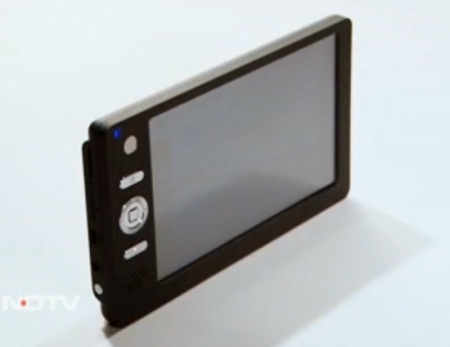
India's $35 Android tablet!


The Akash Tablet is now here folks! Akash means sky in Hindi and the $35 tablet has arrived. It is the worlds cheapest tablet and runs on Android 2.2 software! As we all know, India isn't the richest country in the world but is now helping it's people to get their hands on the new tech. The average house hold income in India is less then $1000 USD. Most of the people cannot afford to pay $600 for and iPad, so I think this is a great product for residents of India. The 7 inch tablet is 350 grams, while the iPad 2 with WiFi is 600 grams. In this post, you will find all that you need to know about the Akash Tablet. (Please note that the source of the information below is from Wikipedia.)

Hardware:

7-inch 800x480 resistive touchscreen
Rugged casing with a rubberized feel
Wi-Fi enabled (802.11 a/b/g WiFi)
Mini and full USB
miniSD card slot
Subscriber Identity Module (SIM card) slot
Video out
Headphone jack
256MB of RAM
2 GB of stoage memory. Expandable via microSD memory card
2 Watts of power consumption with solar charging option

Software:

Android2.2 operating system
Document Rendering
Supported Document formats: DOC, DOCX, PPT, PPTX, XLS, XLSX, ODT, ODP
Educational software developed at Indian Institute of Technology
Web browsing, video conferencing and word processing software
PDF viewer, Text editor
Multimedia and Image Display
Image viewer supported formats: PNG, JPG, BMP and GIF
Supported audio formats: MP3, AAC, AC3, WAV, WMA
Supported video formats: MPEG2, MPEG4, AVI, FLV
Communication and Internet
Web browser - Standards Compliance: xHTML 1.1 compliant, JavaScript 1.8 compliant
Separate application for online YouTube video
Safety and other standards compliance
CE certification / RoHS certification

Please note, this information is provided by Wikipedia. For full info please visit here:http://en.wikipedia.org/wiki/Aakash_tablet


Apple launches iPhone 4s video!